Batch Jobs for SparkClient: Submitting and Managing Spark Workloads from Python
How the SparkClient SDK's new batch job APIs work under the hood — submit_job(), FileJob/FuncJob, the lifecycle APIs, and log retrieval.
- Why this matters in practice
- Quick start
- Two ways to submit a job
- What happens when you call submit_job()
- Configuring a job with spark_conf and options
- Lifecycle APIs
- Log retrieval
- What’s next
- Want to Help?
As part of GSoC 2026, we’ve been extending SparkClient (KEP-107) — the Kubeflow SDK’s Python interface for running Spark on Kubernetes — with support for batch job submission and lifecycle management. Previously, SparkClient covered interactive workloads well via connect(), but running a batch job (the “submit a script, walk away, come back to results” kind of work that powers ETL pipelines and scheduled data prep) meant working with the SparkApplication CRD directly.
This post walks through how the new submit_job() API and its accompanying lifecycle APIs work, what’s happening on the cluster when you call them, and where the current implementation draws its boundaries.
Why this matters in practice
Running Spark on Kubernetes usually assumes a platform or infra team is around to stand up and maintain the cluster — the Spark Operator, the SparkApplication CRDs, the driver/executor resource tuning. That’s a fair assumption at a large org with a dedicated platform team. It’s a much bigger ask for a smaller team, or for the data engineer or ML engineer who just needs a job to run and doesn’t have that infra support behind them.
submit_job() is built for exactly that gap — FileJob for teams running existing ETL scripts, FuncJob for those who’d rather hand over a Python function directly — with the same predictable lifecycle underneath either way. The practical payoff: running a Spark step no longer requires users to author and manage SparkApplication resources directly—the SDK handles that for them.
Quick start
If you’d rather run something than read about it first, the examples/spark directory in the kubeflow/sdk repo has runnable scripts covering everything in this post:
-
batch_job_lifecycle.py— submitsspark_job.pyas aFileJob, then walks through waiting, checking status, pulling logs, and cleanup -
batch_func_job_lifecycle.py— the same lifecycle, with aFuncJobinstead -
batch_job_options.py— the same lifecycle withoptionsapplied, then verified on the created resource -
batch_failed_job.py— what a failure looks like end to end -
spark_job.py— the minimal PySpark script the lifecycle examples actually submit and run
Clone the repo and run any of them directly against a cluster with the Spark Operator installed. The rest of this post walks through what those scripts are actually doing under the hood.
Two ways to submit a job
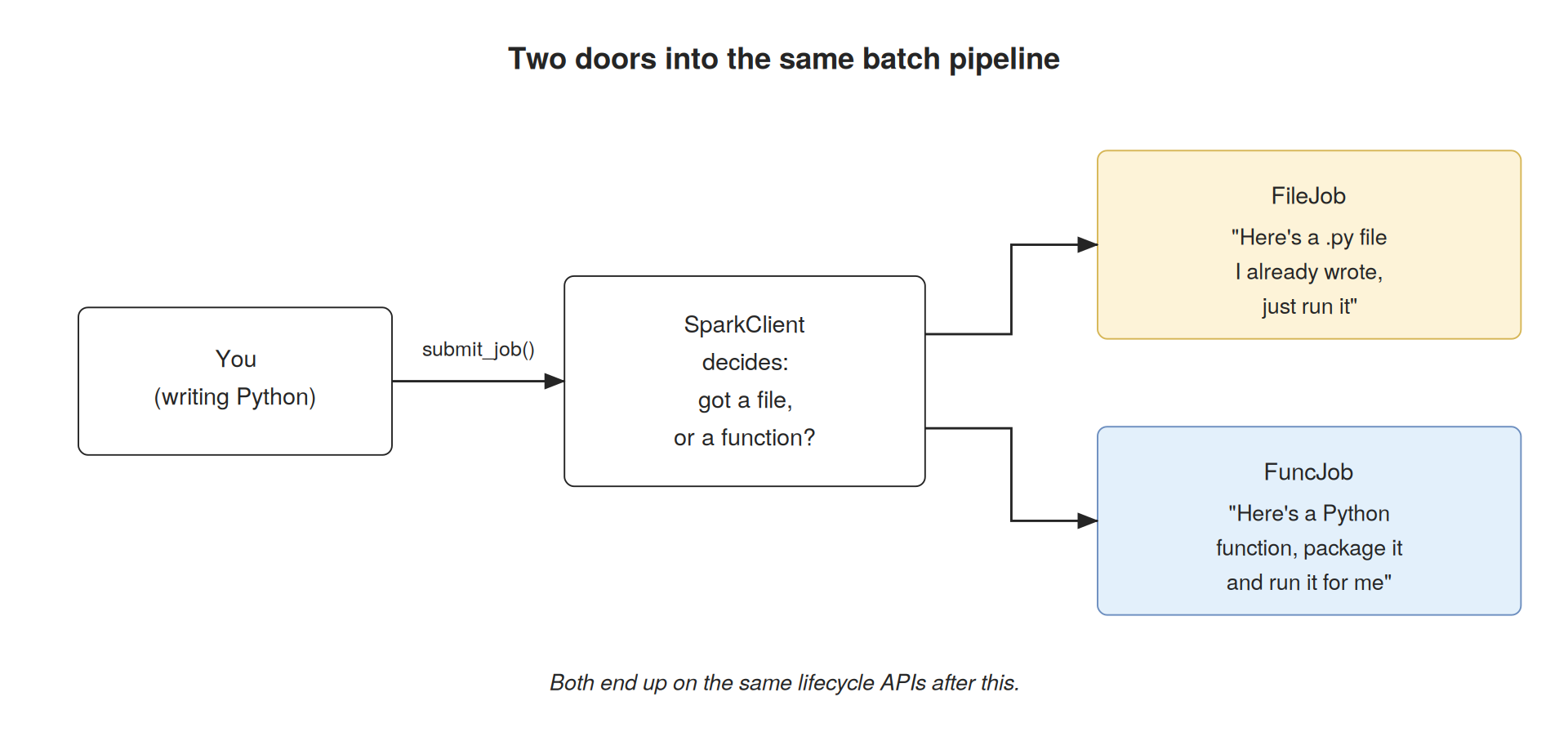
submit_job() accepts either a FileJob or a FuncJob, and builds a SparkApplication spec from whichever one you pass in.
A FileJob points at an existing script:
from kubeflow.spark import FileJob

job = FileJob(
    file_source="https://raw.githubusercontent.com/kubeflow/sdk/main/examples/spark/spark_job.py",
)
file_source can reference both remote URIs (such as s3a://, gs://, hdfs://, or https://) and local:// paths. The SDK passes the URI through to the Spark runtime, which is responsible for resolving and accessing it. For a local:// path, the SDK does not package or upload anything on your behalf — the file must already be available inside the driver pod, for example through a volume mounted with spark.kubernetes.driver.volumes.* entries in spark_conf. Batch jobs currently run on a fixed apache/spark image and don’t accept PodTemplateOverride (Spark Connect only), so baking the script into a custom image or mounting a PVC through a pod template isn’t an option yet. FileJob describes where the file lives, not how it gets there.
A FuncJob takes a Python function instead of a file:
from kubeflow.spark import FuncJob

def transform():
    # your Spark logic here
    ...

job = FuncJob(func=transform)
The function has to be a plain, top-level function defined in an importable .py module — the SDK reads its source directly via inspect.getsource() to serialize it, which means lambdas, decorated functions, async functions, and anything defined interactively (a REPL or notebook cell) aren’t supported.
Since only the function source is serialized, the function should be self-contained. Any required imports should be placed inside the function body so they’re available when the generated script is executed. Parameters are passed separately via FuncJob(func=..., func_args={"samples": 10}), and their values must be JSON-like primitives — strings, numbers, booleans, None, and lists or dicts of those.
For example:
def transform():
    from pyspark.sql import SparkSession

    spark = SparkSession.builder.getOrCreate()

    # your Spark logic here
    ...
If you’re prototyping in a notebook, the function still needs to live in a module you import from, not be defined inline in a cell.
For a FuncJob, the SDK serializes the function into a generated script, writes it to a shared emptyDir volume through an init container, and points the driver at the generated file instead of a script you had to author yourself. This is the one case where the SDK does the packaging step for you.
Once a job is submitted, both types converge on the same shape — a name, a namespace, a status, a driver pod, some executors — so every lifecycle call downstream treats a FileJob and a FuncJob identically.
What happens when you call submit_job()
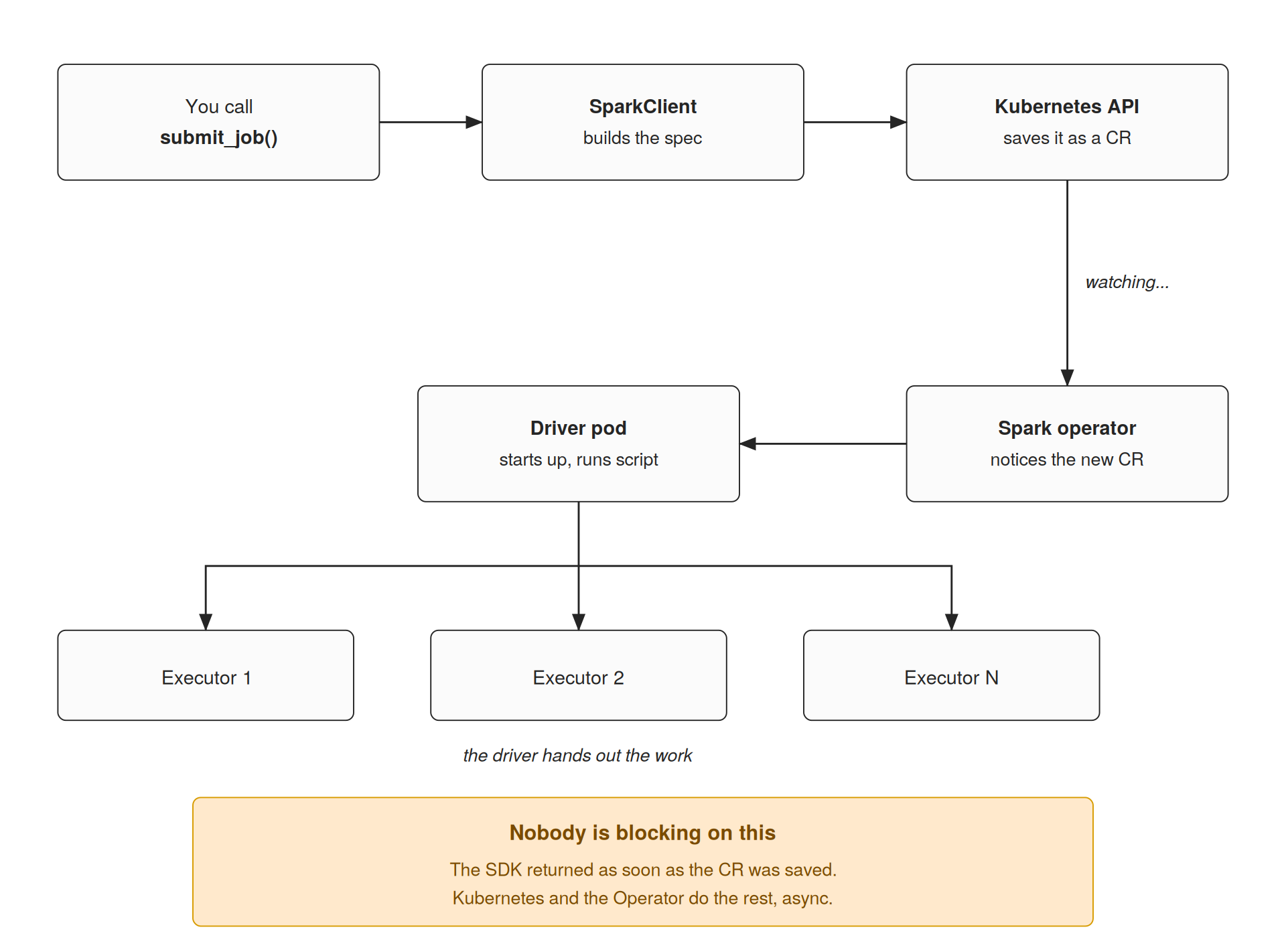
submit_job() doesn’t run the job — it hands off a request and returns as soon as the request is accepted:
-
SparkClient validates and builds a spec. Your
FileJoborFuncJobgets translated into aSparkApplicationcustom resource. - The Kubernetes API stores it. At this point nothing is running yet — the resource exists, but nobody’s acted on it.
-
The Spark Operator notices. It watches for
SparkApplicationresources in the namespaces it was configured for and reacts as soon as a new one appears. -
A driver pod starts. For a
FuncJob, an init container writes the serialized function to a volume first; for aFileJob, the driver points straight at the referenced script. - The driver fans out to executors, however many were requested.
submit_job() returns once step 2 completes — it doesn’t block on job completion. That’s what the lifecycle APIs are for.
Configuring a job with spark_conf and options
Beyond the job definition itself, submit_job() takes spark_conf for Spark-level tuning and options for Kubernetes-level configuration.
spark_conf maps straight to Spark configuration properties:
client.submit_job(
    job=FileJob(
        file_source="https://raw.githubusercontent.com/kubeflow/sdk/main/examples/spark/spark_job.py",
    ),
    spark_conf={
        "spark.sql.adaptive.enabled": "true",
        "spark.sql.shuffle.partitions": "200",
    },
)
options covers the Kubernetes-native pieces that don’t belong in Spark config — labels, annotations, node placement, and job naming — as a list of typed option objects:
import uuid

from kubeflow.spark import (
    Annotations,
    FileJob,
    Labels,
    Name,
    NodeSelector,
    SparkClient,
    Toleration,
)

client.submit_job(
    job=FileJob(
        file_source="https://raw.githubusercontent.com/kubeflow/sdk/main/examples/spark/spark_job.py",
    ),
    options=[
        Name(f"batch-job-options-{uuid.uuid4().hex[:8]}"),
        Labels({"app": "spark", "team": "ml"}),
        Annotations({"owner": "kubeflow", "environment": "dev"}),
        NodeSelector({"kubernetes.io/os": "linux"}),
        Toleration(
            key="dedicated",
            operator="Equal",
            value="spark",
            effect="NoSchedule",
        ),
    ],
)
Both are optional — the earlier examples in this post work fine without either — but together they cover the two axes teams usually need to customize: how Spark runs the job, and how Kubernetes schedules and labels it. Worth knowing what you get when you leave them out: one executor, 1 core and 512Mi for both driver and executor, and the spark-operator-spark service account. Driver and executor resources aren’t configurable through submit_job() today, unlike connect(), which accepts both Driver and Executor objects.
Lifecycle APIs
One design goal for these lifecycle APIs was consistency across Kubeflow SDKs. Rather than introducing a new management model, SparkClient follows the same lifecycle pattern as TrainerClient. If you’ve previously managed distributed training workloads with TrainerClient, the APIs for submitting, monitoring, and managing Spark batch jobs should feel immediately familiar.
This consistency makes it easier to move between different stages of an ML workflow. A team might use SparkClient to prepare and transform large-scale datasets with Apache Spark, then use TrainerClient to launch distributed PyTorch training on the processed data. Although the underlying workloads are different, both clients expose a similar lifecycle interface.
| TrainerClient | SparkClient |
|---|---|
train() |
submit_job() |
list_jobs() |
list_jobs() |
get_job() |
get_job() |
get_job_logs() |
get_job_logs() |
wait_for_job_status() |
wait_for_job_status() |
delete_job() |
delete_job() |
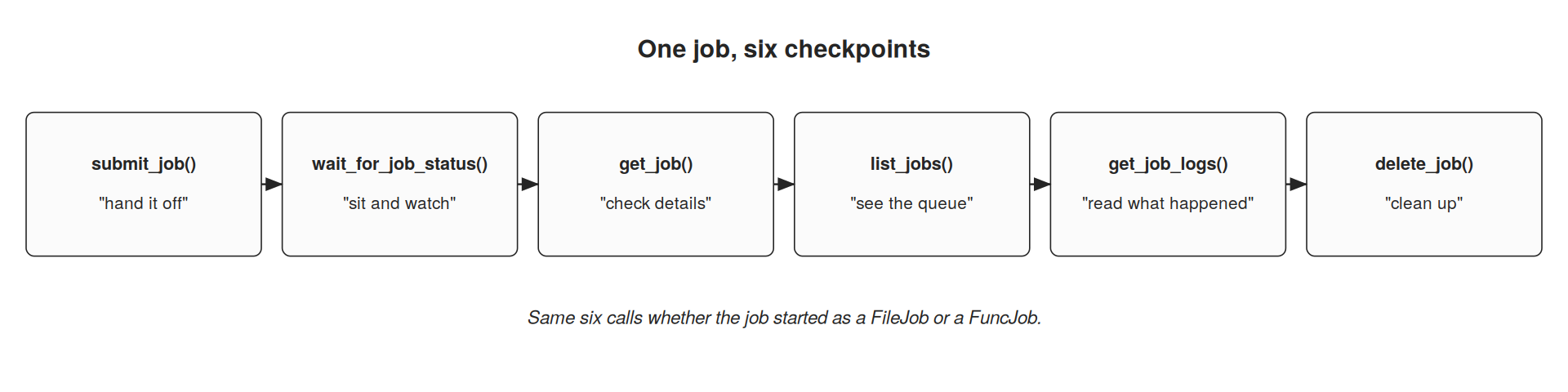
Submission is the first of six checkpoints; the remaining five manage the job regardless of how it started:
Submit a batch job
from kubeflow.spark import FileJob, SparkClient, SparkJobStatus

client = SparkClient()

job_name = client.submit_job(
    FileJob(
        file_source="https://raw.githubusercontent.com/kubeflow/sdk/main/examples/spark/spark_job.py",
    ),
    num_executors=3,
    resources_per_executor={"cpu": "2", "memory": "4Gi"},
)
Output:
spark-job-e09b45b5
Wait for a job to complete
client.wait_for_job_status(
    job_name,
    status={SparkJobStatus.COMPLETED, SparkJobStatus.FAILED},
    timeout=600,
    polling_interval=2,
)

print(job.status)
Output:
COMPLETED
Get job details
job = client.get_job(job_name)
print(job.status, job.num_executors, job.driver_pod_name)
Output:
COMPLETED 3 spark-job-e09b45b5-driver
List running jobs
for job in client.list_jobs(status={SparkJobStatus.RUNNING}):
    print(job.name, job.status)
Output:
spark-job-a13d8c72 RUNNING
spark-job-b91f7a2e RUNNING
Stream job logs
for line in client.get_job_logs(job_name, follow=True):
    print(line)
Output:
25/08/08 17:54:02 INFO SparkContext: Running Spark version 4.x.x
25/08/08 17:54:05 INFO SparkContext: Starting job...
25/08/08 17:54:12 INFO DAGScheduler: Job 0 finished successfully
25/08/08 17:54:18 INFO SparkContext: Spark application completed successfully
Delete a job
client.delete_job(job_name)
Output:
Job deleted successfully.
wait_for_job_status() polls the SparkApplication’s status on a timer and returns the resolved SparkJob once it reaches one of the target statuses. SDK-level status is a simplified four-state model (CREATED, RUNNING, COMPLETED, FAILED) mapped from the underlying SparkApplication states, so callers don’t need to interpret raw CRD conditions. Two details worth knowing: if the job reaches FAILED and FAILED isn’t in your target set, the call raises RuntimeError right away instead of waiting out the timeout — which is why the example above passes both COMPLETED and FAILED — and any operator state the SDK doesn’t recognize is mapped to FAILED conservatively.
Log retrieval
get_job_logs() reads from the driver pod only, via the Kubernetes API, with follow=True supported for streaming as new lines are written.
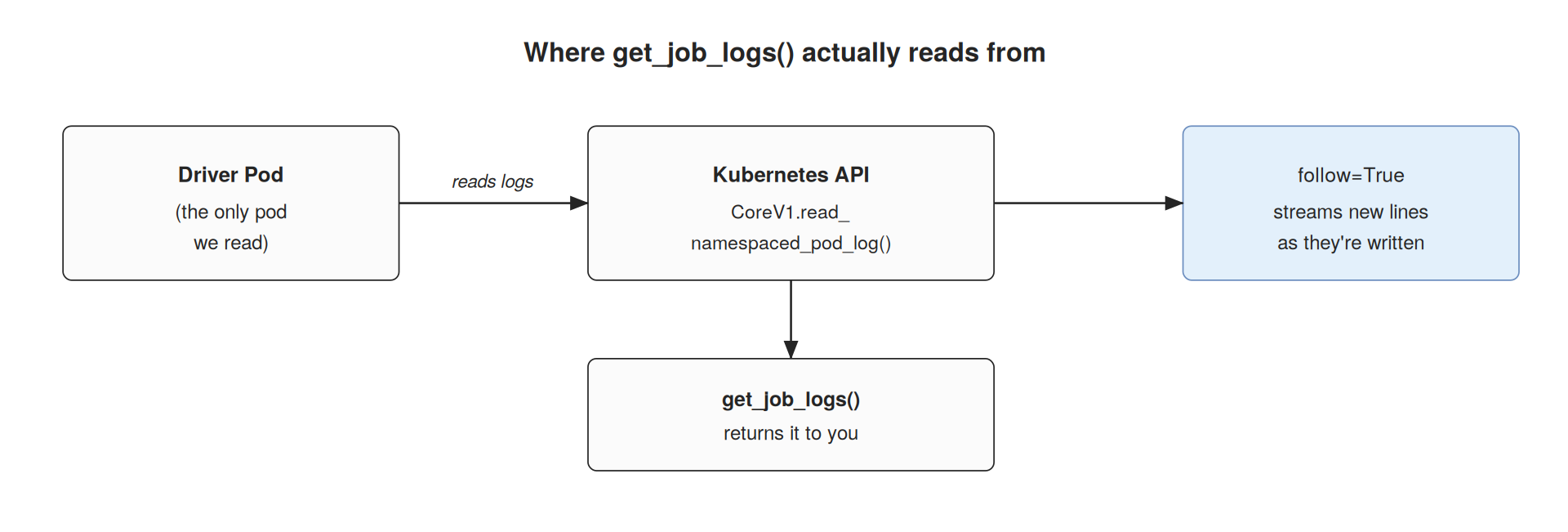
Executor-level log access isn’t wired in yet — the driver is where Spark surfaces stage failures, exceptions, and final job status, so it covers the common debugging path for this first release. Executor logs are a reasonable follow-up, not a blocker for shipping batch support. One caveat either way: logs are only readable while the driver pod exists, so get_job_logs() raises RuntimeError if the driver hasn’t started yet or has already been cleaned up — pull them before delete_job().
What’s next
Batch submission and the lifecycle APIs have unit and end-to-end tests for both success and failure paths. The next phase of this project focuses on observability — pulling metrics from the Spark REST API (stage progress, executor stats, job duration), structured event tracking, and eventually a Prometheus-compatible export path.
None of this replaces the Spark Operator or reinvents Spark on Kubernetes — SparkClient stays a thin, Kubernetes-native layer on top of it. The goal is narrower and more practical: let the people who actually need to run Spark jobs — data engineers scheduling ETL, ML engineers prepping training data — do it from Python, without first becoming experts in SparkApplication YAML.
Want to Help?
The Kubeflow community is always looking for more contributors, testers, and users interested in Spark on Kubernetes and the broader SDK ecosystem. If you’d like to get involved:
- Explore the Kubeflow SDK documentation to learn more about SparkClient, TrainerClient, and the rest of the SDK.
- Learn about the ML Experience and Kubeflow SDK APIs, which outlines the vision for consistent Python APIs across Kubeflow projects.
- Visit the Kubeflow website or GitHub repositories.
- Join the Kubeflow Slack channels.
- Subscribe to the kubeflow-discuss mailing list.
- Attend the biweekly Kubeflow Spark on Kubernetes call hosted by the Data working group.
Feel free to share questions or feedback in the comments below — always happy to talk SparkClient.