Introducing Kubeflow MCP: An Agent Interface for Cloud Native AI at Scale
An open MCP interface that lets AI agents operate Kubeflow directly from conversation.
- Agent-Native Infrastructure
- What This Changes
- Where It Fits
- Key Features
- Get Started
- What’s Next?
- Get Involved
Agent-Native Infrastructure
AI agents are rapidly becoming the primary interface for software development. Engineers use them to write code, debug systems, and automate operational workflows. But when it comes to AI infrastructure (submitting training jobs, managing GPU resources, monitoring distributed workloads) agents hit a wall. They can generate scripts and suggest commands, but they cannot interact with the cluster directly.
The Kubeflow MCP Server removes that wall. It exposes Kubeflow operations as Model Context Protocol (MCP) tools, an open standard that gives AI agents structured, discoverable access to external systems. The agent talks to Kubeflow. Kubeflow talks back.
What This Changes
Without MCP, the workflow looks like this: you describe what you want to your agent, it generates a Python script, you run the script, something fails, you paste the error back, the agent suggests a fix, you try again. The human is the message bus between the agent and the cluster.
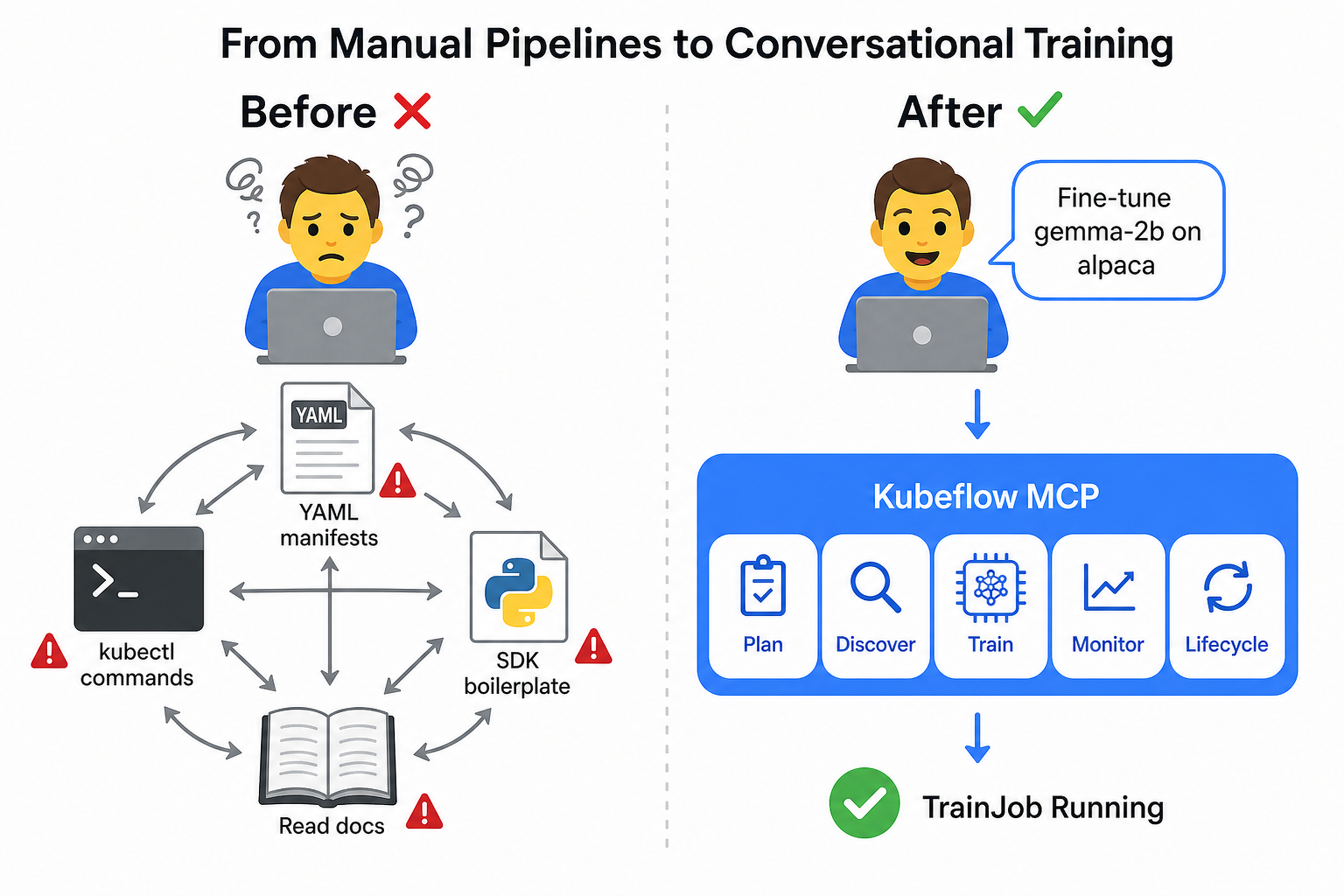
With MCP, the agent calls Kubeflow tools directly. It checks your cluster, estimates resource requirements, previews the training job spec, waits for your approval, submits it, and streams logs back, all within the same conversation. You stay in control, but you’re no longer the bottleneck.
Here’s what a real interaction looks like:
User: "Fine-tune Llama-3.2-1B on the alpaca dataset using LoRA"

1. Agent calls pre_flight(model="meta-llama/Llama-3.2-1B")
   → Trainer v2.2 installed, 4x A100 available, torchtune runtime found

2. Agent calls fine_tune(model="hf://meta-llama/Llama-3.2-1B",
                         dataset="hf://tatsu-lab/alpaca",
                         runtime="torchtune-llama3.2-1b",
                         confirmed=False)
   → Returns full TrainJob spec for review

3. User: "Looks good, submit it"
   Agent calls fine_tune(..., confirmed=True)
   → TrainJob "train-llama-abc" created

4. Agent calls get_training_logs("train-llama-abc")
   → Epoch 1/3 ━━━━━━━━━━━━ 34% loss=1.42
Four tool calls. No YAML. No copy-pasting between tabs. The agent operated directly on the cluster, and nothing happened without the user’s explicit approval.
Where It Fits
The diagram below shows the three layers: AI agents on the left, the MCP Server in the middle translating tool calls into Kubernetes API operations, and the Kubeflow infrastructure on the right executing them.
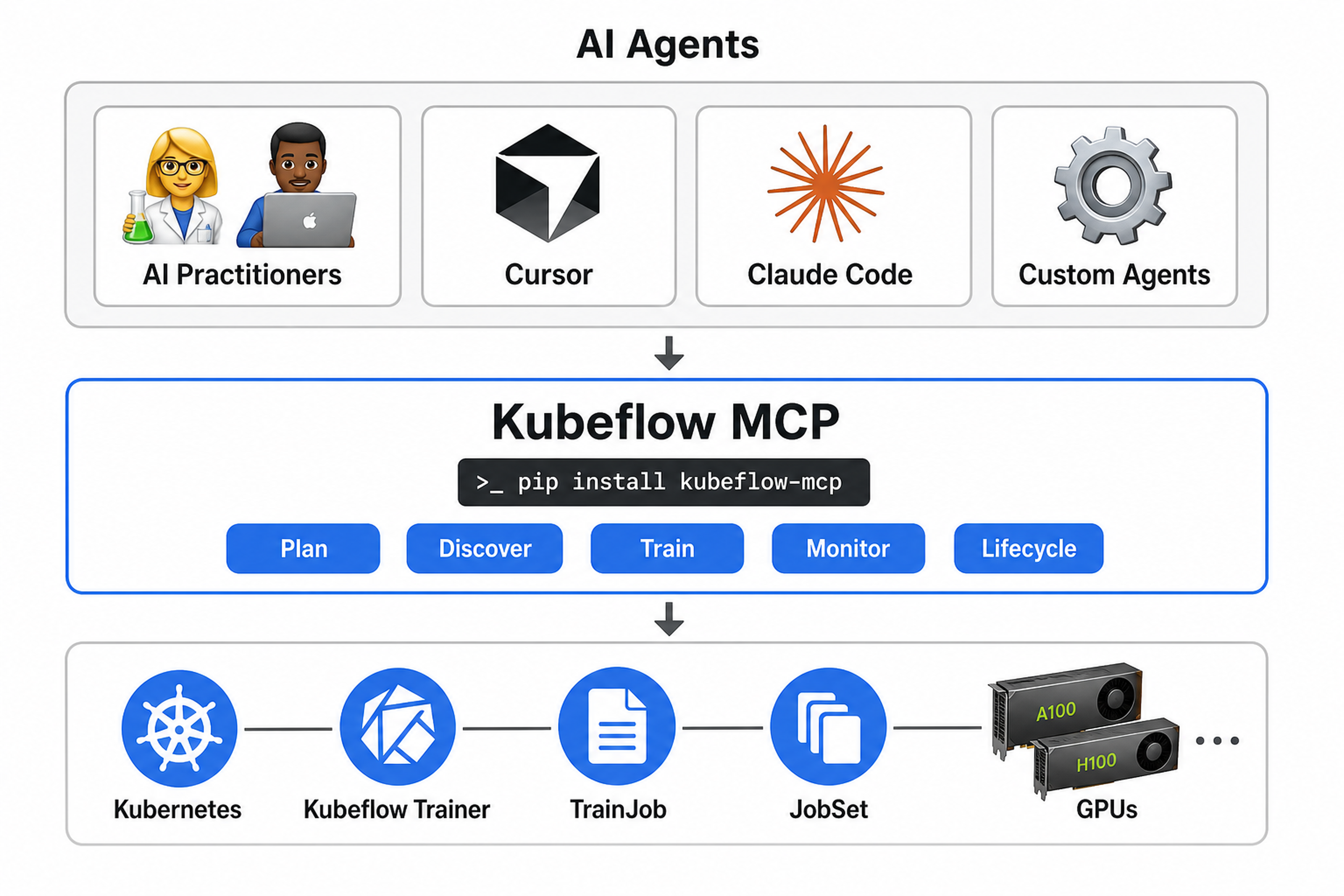
The MCP Server is not a replacement for the Kubeflow SDK. It’s a new interface layer that sits alongside it. The SDK is for writing Python programs. The MCP Server is for AI agents that need to act on your behalf.
Both are backed by the same infrastructure: Kubeflow Trainer creates TrainJobs, JobSet manages distributed execution, and Kubernetes schedules pods onto GPUs. The difference is who’s driving: a Python script you wrote, or an agent you’re conversing with.
The Trainer client is fully implemented today. As additional Kubeflow components gain MCP support, the same server will expose them all through a unified agent interface.
Key Features
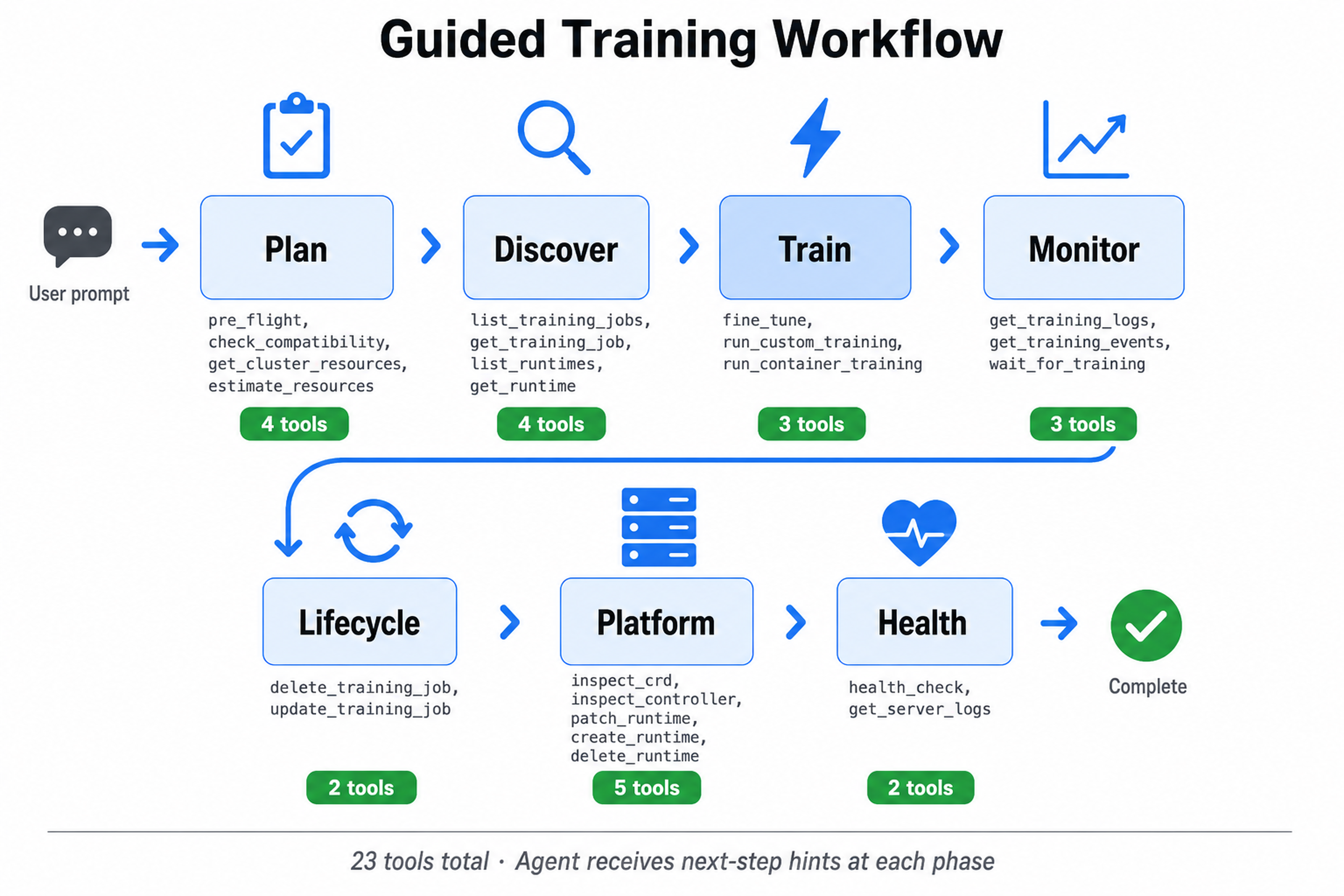
Guided Workflow with 23 Tools
Tools are organized into phases that guide agents through the correct sequence:
| Phase | Tools | What they do |
|---|---|---|
| Planning |
pre_flight, check_compatibility, get_cluster_resources, estimate_resources
|
Validate the cluster, estimate GPU needs, catch blockers early |
| Discovery |
list_training_jobs, get_training_job, list_runtimes, get_runtime
|
Browse what’s running and what runtimes are available |
| Training |
fine_tune, run_custom_training, run_container_training
|
LoRA/QLoRA fine-tuning, custom distributed scripts, or container jobs |
| Monitoring |
get_training_logs, get_training_events, wait_for_training
|
Stream logs, diagnose scheduling issues, wait for completion |
| Lifecycle |
delete_training_job, update_training_job
|
Suspend, resume, or clean up jobs |
| Platform |
inspect_crd, inspect_controller, patch_runtime, create_runtime, delete_runtime
|
Admin operations for CRDs and runtimes |
| Health |
health_check, get_server_logs
|
Server diagnostics |
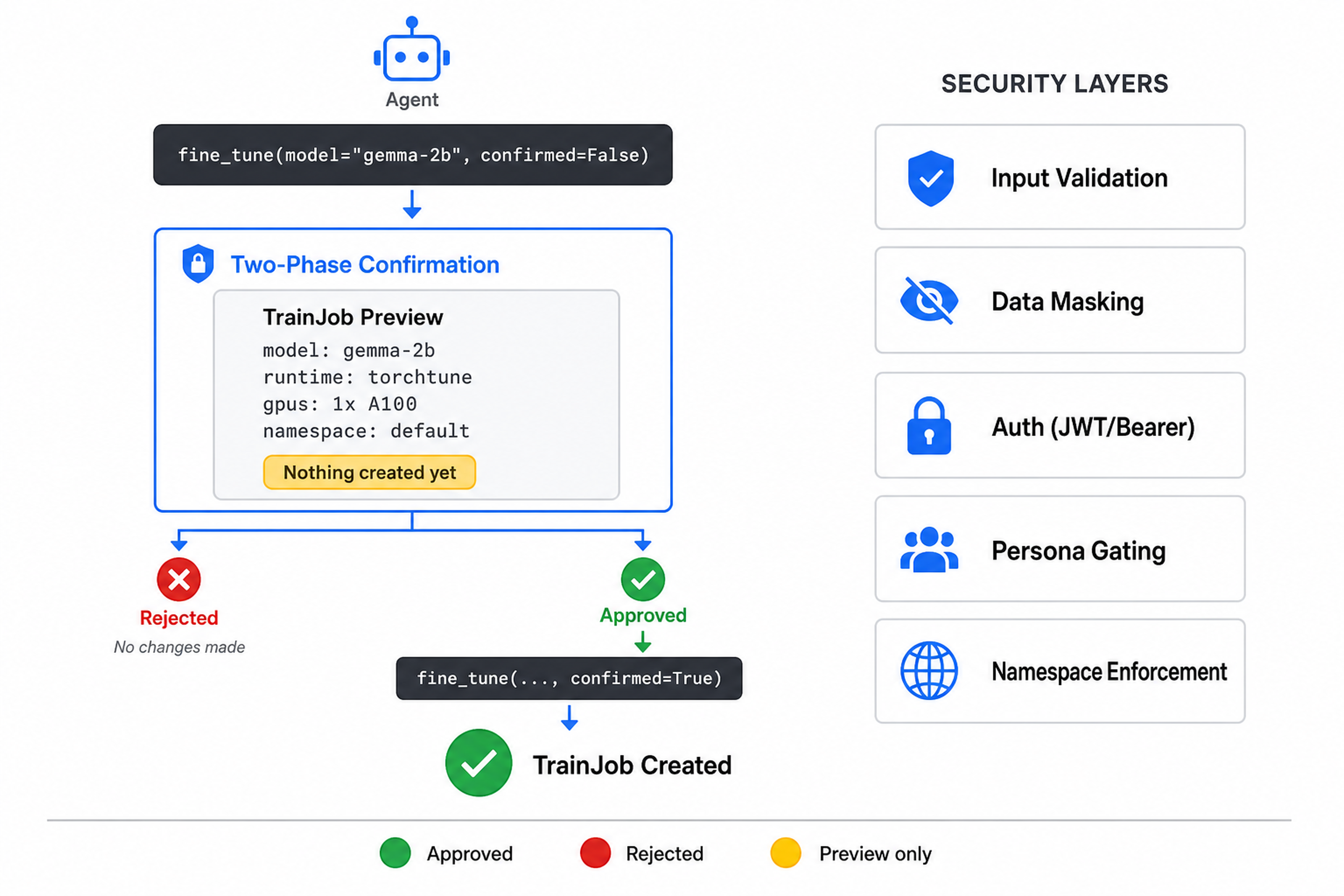
Two-Phase Confirmation
Every job-creating and destructive operation previews first. The agent sees exactly what would happen before anything touches the cluster, and only proceeds with explicit approval. Training submission, job deletion, and runtime create/patch/delete are all gated this way, so an agent can never accidentally create or destroy a resource without the user seeing the full spec first.
Security
The server is designed to be safe by default:
- Input validation: Kubernetes names and namespaces are validated against strict patterns; injection and path traversal attempts are rejected
- Data masking: Tokens, passwords, and credentials are automatically masked in logs
- DNS rebinding protection: Host and Origin header validation on HTTP transport
- Ownership guards: Non-admin personas can only modify jobs created through the MCP server
- Authentication: Bearer token for development, JWT/JWKS verification for production
See SECURITY.md for the full threat model and hardening guide.
Personas
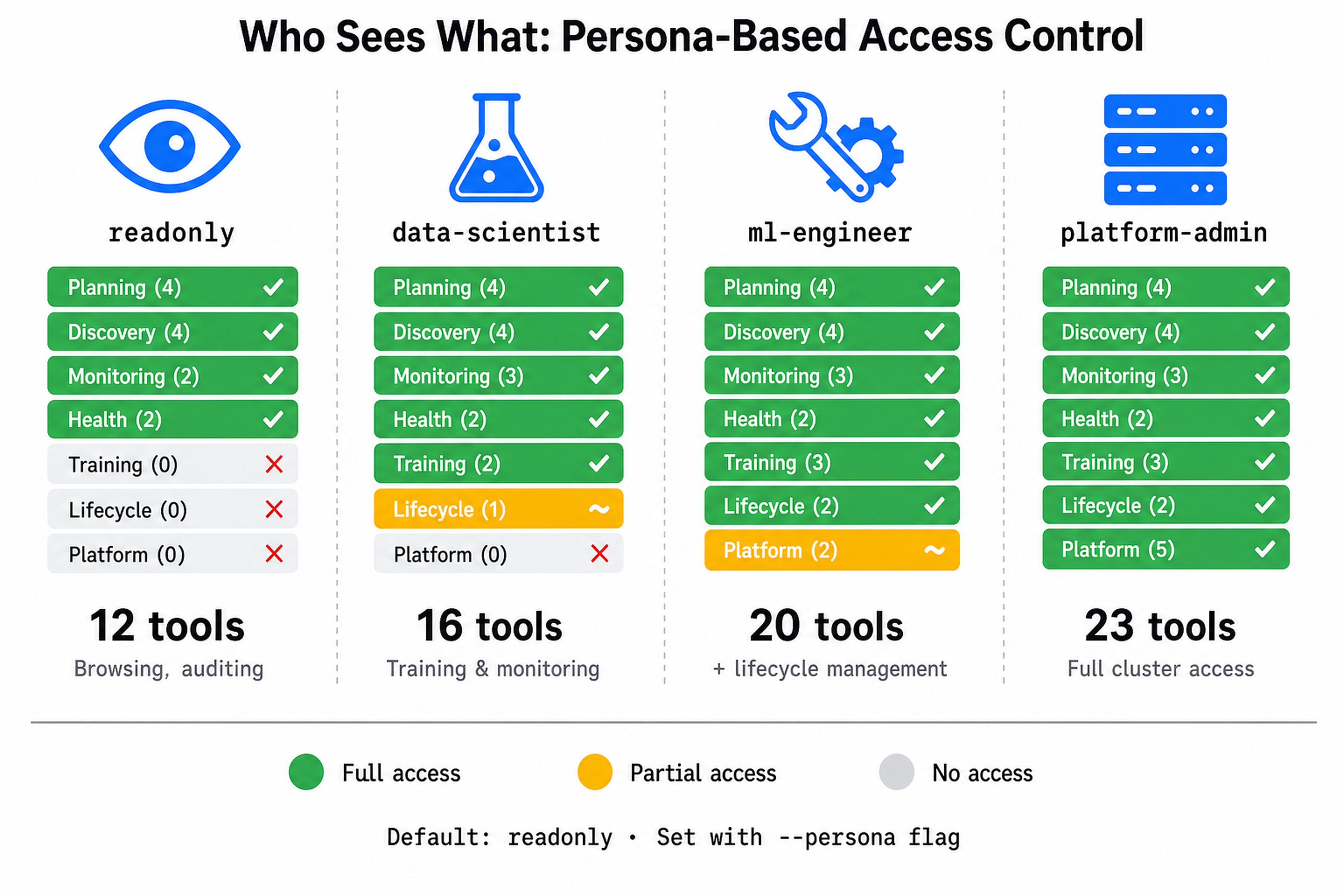
Not everyone needs the same level of access. Four built-in personas control which tools an agent can see:
| Persona | Tools available | Intended for |
|---|---|---|
readonly |
12 | Browsing, auditing, demos |
data-scientist |
16 | Training, monitoring, deleting own jobs |
ml-engineer |
20 | + container jobs, suspend/resume, CRD inspection |
platform-admin |
23 | Full access including CRD/runtime ops |
kubeflow-mcp serve --persona data-scientist
Token-Efficient Modes
LLMs have limited context windows. Registering all 23 tools loads every tool description and input schema up front. Two alternative modes shrink that surface dramatically while preserving full functionality:
| Mode | Tools exposed | How it works |
|---|---|---|
full |
23 | All tools registered directly |
progressive |
3 | Agent discovers tools on demand via meta-tools |
semantic |
2 | Agent searches tools by natural language description |
kubeflow-mcp serve --mode progressive
Platform Awareness
The server auto-detects your Kubernetes distribution and adapts its guidance:
- OpenShift: Adds required writable volumes, sets environment variables to avoid permission errors under restricted security contexts
- EKS/GKE: Identifies the platform from node pool labels and surfaces GPU toleration guidance
- Kind/Minikube: Works out of the box for local development
Resilience
- Rate limiting protects the Kubernetes API from agent-driven burst traffic
- Circuit breaker prevents cascading failures when the cluster is unhealthy
- Structured error hints help agents diagnose and recover without human intervention
Observability
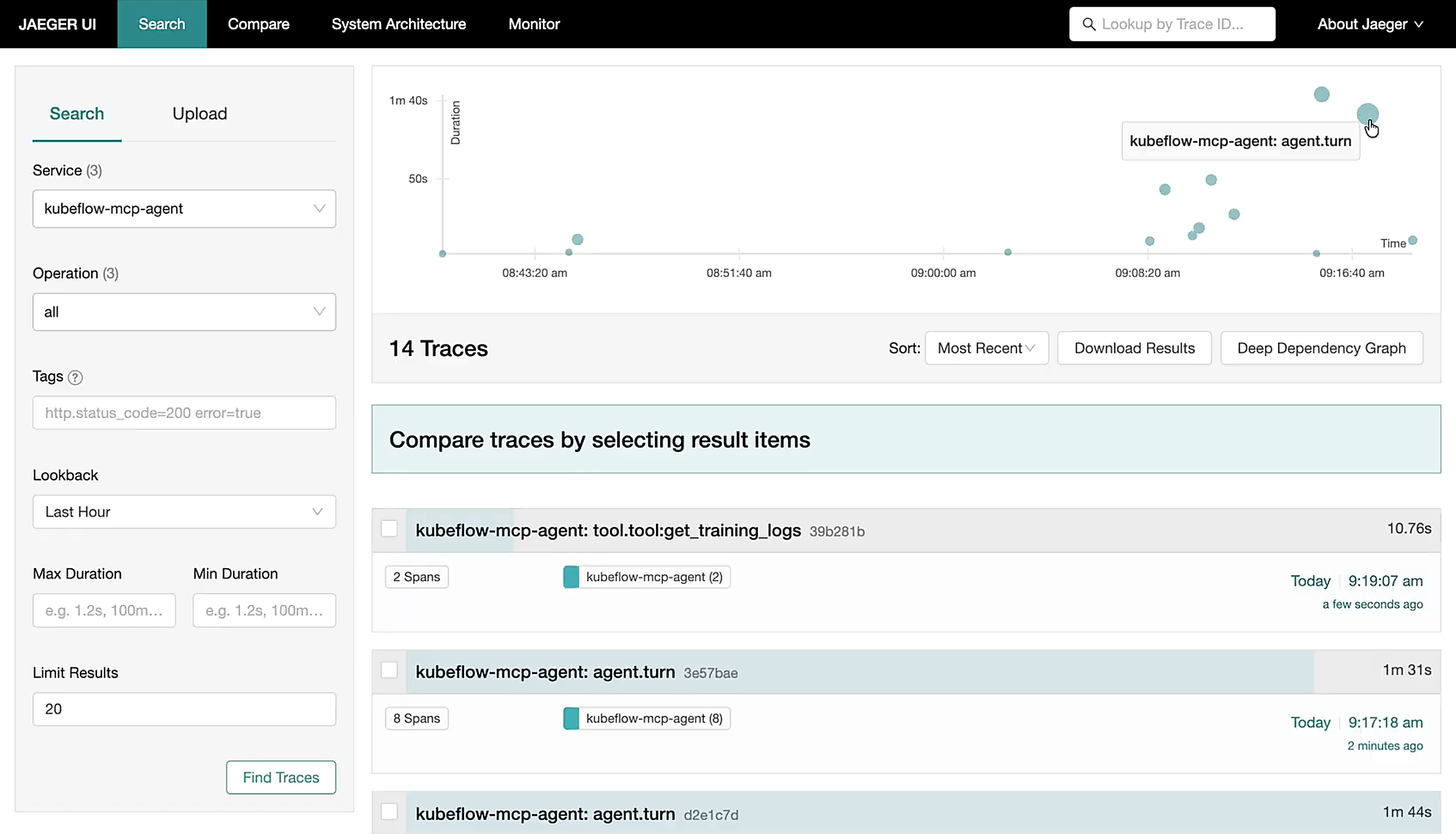
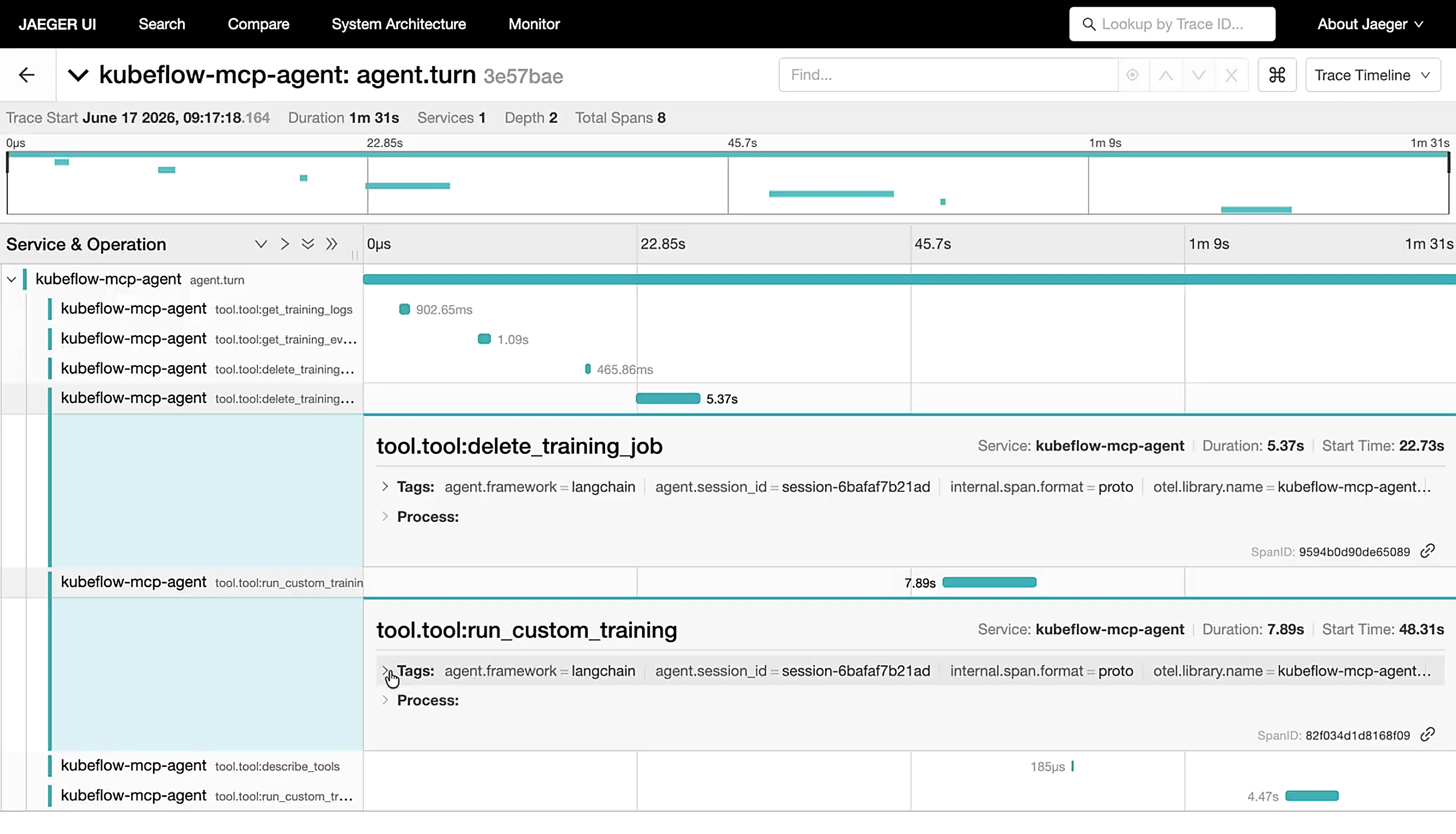
Optional OpenTelemetry tracing covers every tool call with zero code changes:
kubeflow-mcp serve --otel-endpoint http://localhost:4318
Each span carries structured attributes following OpenTelemetry semantic conventions, covering tool identity, execution outcome, persona context, and session correlation for end-to-end tracing across agent sessions.
Get Started
Prerequisites: Python 3.10–3.12, Kubernetes 1.27+, and a cluster with Kubeflow Trainer v2.2+ installed.
pip install kubeflow-mcp
Server Configuration
kubeflow-mcp serve \
  --clients trainer \
  --persona ml-engineer \
  --mode full \
  --instruction-tier full \
  --transport stdio \
  --auth-token SECRET \
  --otel-endpoint URL \
  --log-level INFO \
  --log-format console \
  --no-banner
| Flag | Values | Default |
|---|---|---|
--clients |
trainer, optimizer (stub), hub (stub) |
trainer |
--persona |
readonly, data-scientist, ml-engineer, platform-admin
|
readonly |
--mode |
full, progressive, semantic
|
full |
--instruction-tier |
full, compact, minimal
|
full |
--transport |
stdio, http, sse
|
stdio |
--auth-token |
Bearer token string | — |
--otel-endpoint |
OTLP HTTP endpoint URL | — |
--log-level |
DEBUG, INFO, WARNING, ERROR
|
INFO |
--log-format |
console, json
|
auto-detected |
--no-banner |
Flag | — |
Connect Your Agent
Cursor IDE — add to .cursor/mcp.json:
{
  "mcpServers": {
    "kubeflow": {
      "command": "kubeflow-mcp",
      "args": ["serve"]
    }
  }
}
Claude Code:
claude mcp add kubeflow -- kubeflow-mcp serve
HTTP (remote / team deployment):
kubeflow-mcp serve --transport http --auth-token $MY_TOKEN
Then point any MCP client at http://your-host:8000/mcp.
MCP Inspector
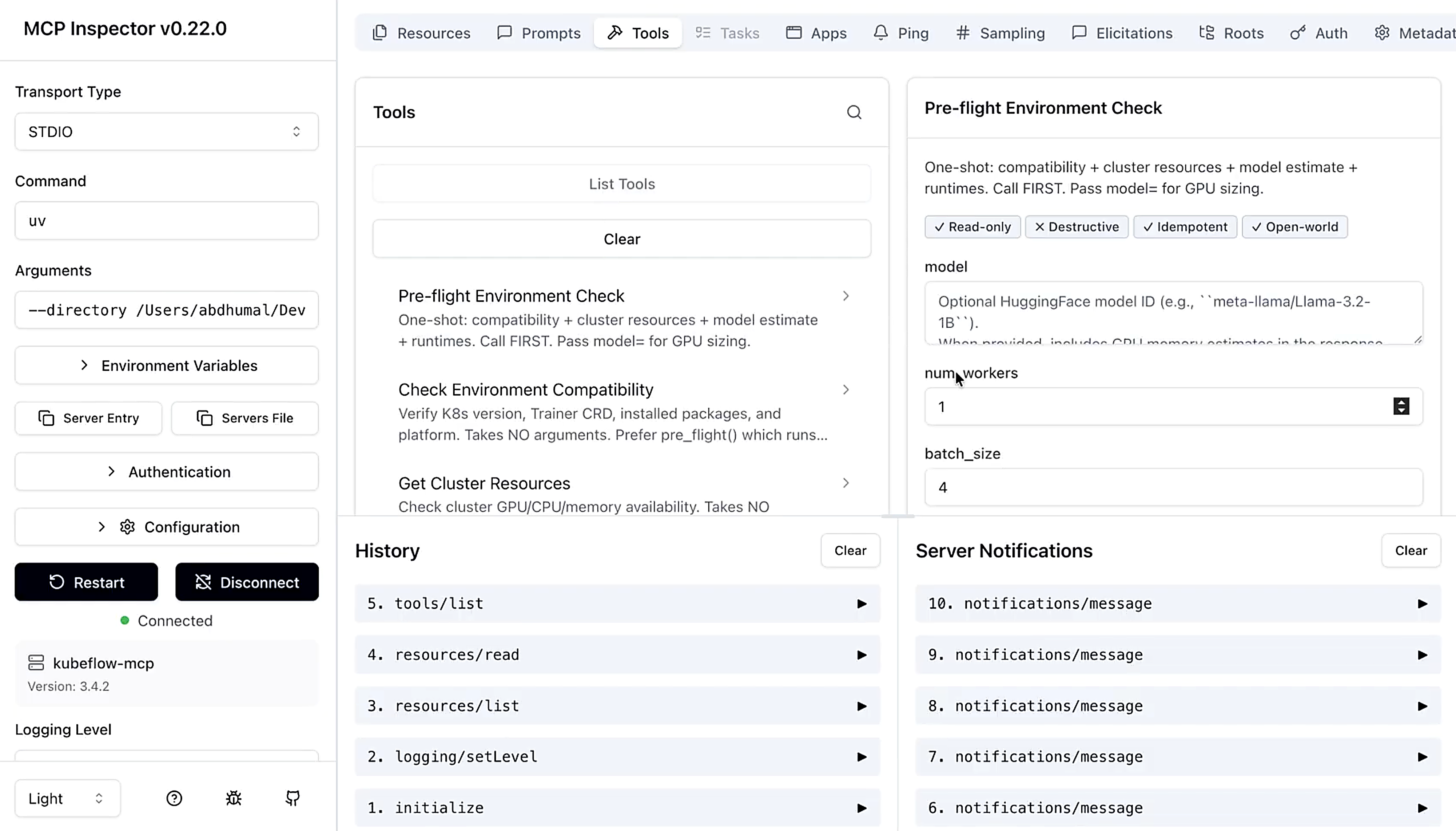
Verify your setup using the MCP Inspector, a visual debugging tool that lets you browse registered tools, invoke them interactively, and inspect server responses:
make inspector
What’s Next?
The Trainer client ships today, but the vision is much bigger: a unified agent interface for the entire Cloud Native AI lifecycle.
| Client | Status | Description |
|---|---|---|
| Kubeflow Trainer | Available ✅ | Train and fine-tune AI models via MCP tools |
| Kubeflow Optimizer (Katib) | Planned 🚧 | Hyperparameter search, trial comparison, optimal config |
| Model Registry | Planned 🚧 | Model registration, promotion, lineage tracking |
| Kubeflow Pipelines | Planned 🚧 | Build, run, and track end-to-end ML workflows |
| Spark Operator | Planned 🚧 | Data processing and feature engineering |
| Feast | Planned 🚧 | Feature store management |
Here’s what’s coming beyond new clients:
-
Multi-Provider Agent Runtime: Pluggable LLM backends (
ollama,litellm) for local or cloud-routed agent inference - Enterprise & In-Cluster: Native OIDC/OAuth, Kubernetes RBAC binding, Helm chart, and Agent-to-Agent (A2A) delegation
- Advanced Training: Checkpoint save/restore, real-time metrics, dynamic scaling, and multi-cluster support
The ROADMAP tracks the full phased delivery plan.
Get Involved
The Kubeflow MCP Server is built by and for the community. We welcome contributions, feedback, and participation from everyone!
Resources:
Connect with the Community:
- Join #kubeflow-ml-experience on CNCF Slack
- Attend the Kubeflow SDK and ML Experience WG meetings
- Check out good first issues to get started
Live Demo (Open Source Summit India 2026): same MCP server, three clients:
- LangChain + LiteLLM: pre-flight checks, confirm gate
- Claude: custom distributed training
- Cursor IDE: fine-tuning with torchtune runtime
The Kubeflow MCP Server is an Apache 2.0 project under the Kubeflow umbrella, a CNCF Graduated project.