Kubeflow SDK v0.4.0: Model Registry, SparkConnect, and Enhanced Developer Experience
- Unified Model Management: The Model Registry Client
- Distributed AI Data at Scale: SparkClient & SparkConnect
- A New Home for Documentation
- Infrastructure & Breaking Changes
- What’s Next for Kubeflow SDK
- Get Involved!
Explore the full documentation at sdk.kubeflow.org
With KubeCon just around the corner, we are pleased to announce the release of Kubeflow SDK v0.4.0. This release continues the work toward providing a unified, Pythonic interface for all AI workloads on Kubernetes.
The v0.4.0 release focuses on bridging the gap between data engineering, model management, and production-ready ML pipelines. The Kubeflow SDK now covers most of the MLOps lifecycle – from data processing and hyperparameter optimization to model training and registration:
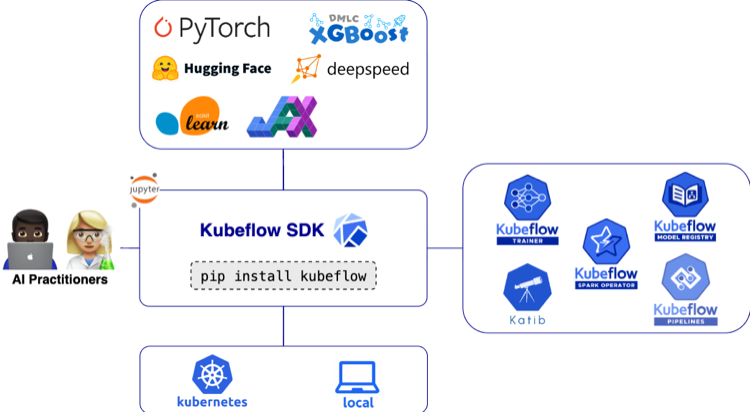
Highlights in Kubeflow SDK v0.4.0 include:
- Model Registry Client for managing model artifacts, versions, and metadata directly from the SDK.
- SparkClient API with SparkConnect support for interactive data processing
- Namespaced TrainingRuntimes for improved isolation and multi-tenant platform management
- Dataset and Model Initializers enabling better parity between local and Kubernetes execution
- A new Kubeflow SDK documentation website with examples, and API reference
- Minimum Python version updated to Python 3.10 for improved security, typing, and runtime performance
Unified Model Management: The Model Registry Client
Managing model artifacts, versions, and metadata across experiments has historically required stitching together multiple tools outside of your training code. In v0.4.0, the SDK introduces ModelRegistryClient – a Pythonic interface to the Kubeflow Model Registry, available under the new kubeflow.hub submodule.
The client exposes a minimal, curated API: register models, retrieve them by name and version, update their metadata, and iterate over what’s in your registry – all without leaving the SDK. It integrates directly with the Model Registry server and supports token auth and custom CA configuration for production clusters. To install the Model Registry server, see the installation guide.
Install the hub extra to get started:
pip install 'kubeflow[hub]'
Usage Example
from kubeflow.hub import ModelRegistryClient

client = ModelRegistryClient(
    "https://model-registry.kubeflow.svc.cluster.local",
    author="Your Name",
)

# Register a model
model = client.register_model(
    name="my-model",
    uri="s3://bucket/path/to/model",
    version="1.0.0",
    model_format_name="pytorch",
)

# List all models
for model in client.list_models():
    print(f"Model: {model.name}")

# Get a specific version and artifact
version = client.get_model_version("my-model", "1.0.0")
artifact = client.get_model_artifact("my-model", "1.0.0")
print(f"Model URI: {artifact.uri}")
Note:
list_models()andlist_model_versions()return lazy iterators backed by pagination, so only the data you consume results in API calls – making it efficient to work with large registries.
Distributed AI Data at Scale: SparkClient & SparkConnect
Data is a fundamental piece to every AI workload, and Apache Spark has become a cornerstone technology for large-scale data processing. However, deploying and managing Spark workloads on Kubernetes has traditionally required users to work directly with Kubernetes manifests and YAML configurations – a process that can be operationally complex. In v0.4.0, the SDK introduces SparkClient – a high-level, Pythonic API that eliminates this complexity, allowing data engineers and ML practitioners to manage interactive and batch Spark workloads on Kubernetes without writing a single line of YAML. Backed by the Kubeflow Spark Operator (KEP-107), the initial version of SparkClient introduces support for interactive sessions through the SparkConnect custom resource. In future releases of the Kubeflow SDK, we will expand this support to include batch workloads as well.
SparkClient supports two operational modes. In create mode, the SDK provisions a new SparkConnect interactive session on Kubernetes for you – handling CRD creation, pod scheduling, networking, and cleanup automatically. In connect mode, you point it at an existing Spark Connect server, useful for shared clusters or cross-namespace access. Either way, you get back a standard SparkSession and can write the same PySpark code you already know.
Install Kubeflow Spark support:
pip install 'kubeflow[spark]'
To install the Spark Operator, see the installation guide.
Usage Example
from kubeflow.spark import SparkClient, Name
from kubeflow.common.types import KubernetesBackendConfig

client = SparkClient(
    backend_config=KubernetesBackendConfig(namespace="spark-test")
)

# Level 1: Minimal - use all defaults
spark = client.connect(options=[Name("my-session")])
df = spark.range(5)
df.show()
client.delete_session("my-session")

# Level 2: Simple -- configure executors and resources
spark = client.connect(
    num_executors=5,
    resources_per_executor={"cpu": "5", "memory": "1Gi"},
    spark_conf={"spark.sql.adaptive.enabled": "true"},
    options=[Name("my-session-2")],
)
df = spark.range(5)
df.show()
client.delete_session("my-session-2")

# Connect mode -- attach to an existing Spark Connect server
spark = client.connect(base_url="sc://spark-server:15002")
df = spark.sql("SELECT * FROM my_table")
df.show()
Default specifications: Spark 4.0.1, 1 executor, 512Mi memory and 1 CPU per pod, 300 second session timeout.
Note: v0.4.0 focuses on SparkConnect session management. Batch job support via SparkApplication CR (
submit_job,get_job,list_jobs) is planned for a future release.
A New Home for Documentation
To support the Kubeflow SDK users and contributors, we’ve introduced a dedicated Kubeflow SDK Website. This site includes:
- Quickstart: Train your first model with Kubeflow SDK
- API Reference: Automatically updated documentation for all SDK modules.
- Examples: Step-by-step guides from local prototyping to remote training.
Infrastructure & Breaking Changes
This release includes several architectural updates to ensure the SDK remains secure, scalable, and easy to use. Please note the following requirements when upgrading to v0.4.0.
Better Isolation with Namespaced TrainingRuntimes
Security and multi-tenancy are core to Kubeflow. In v0.4.0, we’ve introduced support for Namespaced TrainingRuntimes. This allows platform teams to provide curated training environments at the namespace level, ensuring that one team’s custom training configuration doesn’t interfere with another’s.
Upgrade Note: The SDK now prioritizes namespaced runtimes over cluster-wide ones. If you have runtimes with duplicate names in different scopes, verify your TrainerClient calls are targeting the intended resources.
Furthering Parity Between Local and Remote Execution
One of the biggest hurdles in MLOps is the “it worked on my machine” syndrome. With the addition of Dataset and Model Initializers for the ContainerBackend, the SDK now emulates how Kubernetes handles data dependencies.
Whether you are running locally on Docker or at scale on a cluster, the SDK now automatically manages the “plumbing” of mounting and initializing your data. This ensures your local development environment mirrors the data-loading behavior of your production training jobs.
Required: Upgrading to Python 3.10+
To maintain a secure and performant codebase, Kubeflow SDK v0.4.0 is officially moving its minimum requirement to Python 3.10.
This change ensures that all SDK users benefit from better security patches, improved type-hinting, and more efficient asynchronous networking for our API clients.
To Upgrade: Ensure your local environment, Notebook images, and CI/CD pipelines are running Python 3.10 or higher before running pip install --upgrade kubeflow
What’s Next for Kubeflow SDK
Looking ahead, the Kubeflow SDK 2026 Roadmap outlines several exciting initiatives:
- Kubeflow MCP Server to enable AI-assisted interactions with Kubeflow resources
- OpenTelemetry integration for improved observability across SDK operations
- MLflow support for experiment tracking and metrics
- First class support for Kubeflow Pipelines to bring KFP into the unified SDK
- TrainJob checkpointing and dynamic LLM Trainers for more flexible and resilient training workflows
- End-to-end AI pipelines orchestrating data processing, training, and optimization using SparkClient, TrainerClient, and OptimizerClient
- Multi-cluster job submission leveraging Kueue and Multi-Kueue capabilities for Spark and training workloads
- Batch Spark job support via SparkApplication CR for submit, get, and list operations
We encourage the community to review and contribute to the roadmap.
Get Involved!
The Kubeflow SDK is built by and for the community. We welcome contributions, feedback, and participation from everyone! We want to thank the community for their contributions to this release. We invite you to:
-
Try it out:
pip install kubeflow==0.4.0 -
Contribute:
- Read the Contributing Guide.
- Browse the good first issues
- Explore the GitHub Repository
Connect with the Community:
- Join #kubeflow-sdk on CNCF Slack
- Attend the Kubeflow SDK and ML Experience WG meetings
Learn More
- Visit the Kubeflow SDK Website
- View the full Changelog.
Headed to KubeCon + CloudNativeCon 2026 EU? Stop by the Kubeflow booth to see these features in action!